


Hozelock Sensor Water Timer – 2212
Expected Delivery on - .


DESCRIPTION
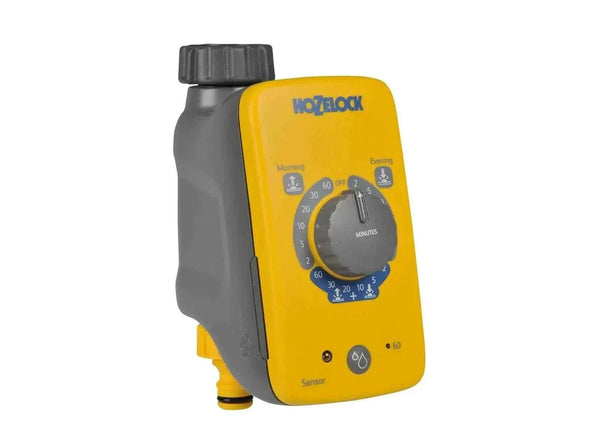
A water timer with a daylight sensor, so it waters at dawn, at dusk or both, when less water is lost to evaporation and plants have time to take it up. There are no clocks or start times to set. Choose how long and how often, and it does the rest.
Specifications
- Watering times: dawn, dusk, or dawn and dusk, triggered by the daylight sensor.
- Run time: 2 to 60 minutes.
- Frequency: once or twice a day.
- Water Now: a manual button for an extra watering on hot days.
- Battery indicator: shows when the battery needs replacing.
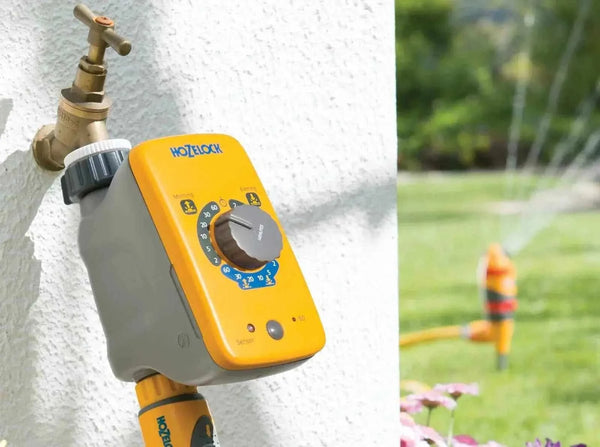
- Water supply: fits outside taps, and works from a water butt.
Fitting
Screw the timer onto your tap or tap splitter by hand, then click your hose or supply pipe onto the outlet. Pick the run time and whether to water once or twice a day, and leave the tap turned on. If you have a pressure reducer, it goes after the timer. Position the timer so the sensor gets natural daylight and isn't under a light that comes on at night.
Use it with
- Tap splitters, to keep a hose outlet free.
- Hozelock 7022 pressure regulator, for drip and micro systems.
- Hozelock watering kits.
- All Hozelock water timers.
- Our 2212 setup guide, with run times to start with.
REVIEWS
FAQ's
Do the Hozelock Timers need batteries ??
DOWNLOADS
SHIPPING & RETURNS
Order Processing & Shipping
Our team works efficiently to ensure most standard orders are processed the same day as purchased Monday - Friday. Once your order has been picked and packed, we hand it over to one of our trusted courier partners for delivery.
As soon as your parcel has shipped, you’ll receive an automated confirmation email containing your unique tracking number. Tracking becomes active once the courier collects your package, allowing you to follow your order’s journey every step of the way.
We maintain a large stock inventory, and our stock control system is updated every few minutes. If an item is shown as in stock on our website, it almost certainly is—and will be shipped quickly.
Returns Policy
We offer a 30-day no-quibble returns policy for your peace of mind.
If you wish to return an item, simply log in to your account and create a return request. Once approved, package the item securely and send it back to us.
Upon receiving your return, our team will process your refund within 5 working days.
Please note:
- Items should be returned in their original condition and packaging.
- Refunds are issued to the original payment method used at checkout.
- Return shipping costs are the responsibility of the customer unless the item is faulty or incorrect.
You might also like
Recently viewed
Let customers speak for us
Great product covers well ,
I’ve purchased other sprinklers,
But has best coverage and a good pressure.
Really impressed with this product.
Will definitely more next year

Easy to install, arrived on time, easy to set up Bluetooth solar panel, great company 👌
Helpful on phone and efficient.

Nicely made, works well, good value

Excellent quality. No leak when connected to other Claber fittings

GREAT ADVICE FROM STEVE AND UP AND RUNNING THE SAME DAY.

Quick delivery, for a birthday present so dont know how well it works.

Just installed this and its simple to use with the Apple App, cant wait to see if it comes on tonight.

Wide range of items at fair prices – some site wanted £14 for end stops. This is FAR more reasonable.
Efficient and reasonably priced. A useful change from the usual six-hole type for certain kinds of watering.

Excellent product

I thought I had submitted a report about this but, yes, it is good and doing the job I bought it for, taking water from three or four large water butts to irrigate a polytunnel system of two ground lines feeding two rows of tomato plants. Just what I need.

Decided whilst my lawn was being levelled that I would pop a few sprinkles around the edge of the lawn spraying in. Now i just need the hose pipe ban to finish before I can start to use them.

Perfect for use when i am away in Spain, perfect for my large indoor plants.

This is a great kit, got it delivered quickly and up and running over the weekend just before we go on holiday. Great Kit.
