App-Controlled Garden Watering System: What to Look For in 2026
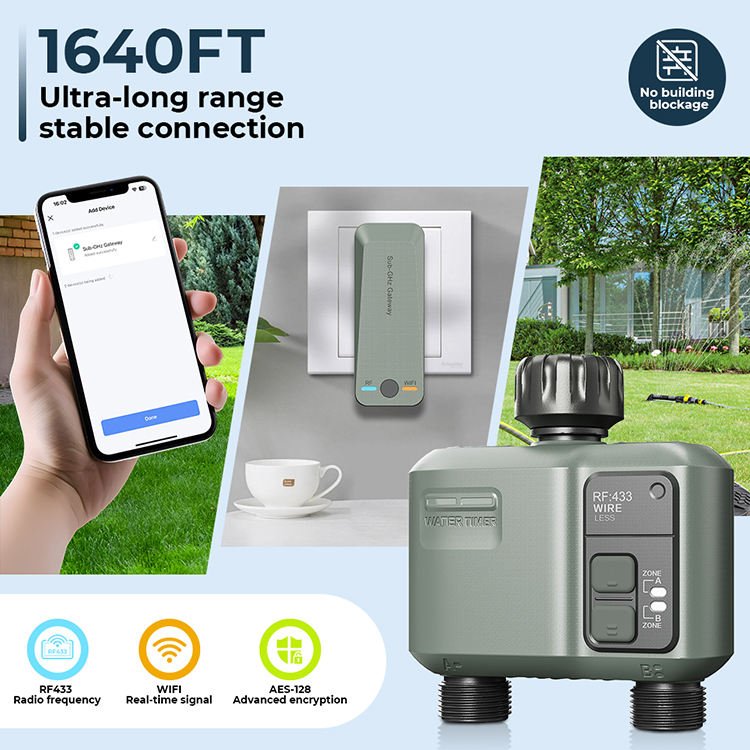
The smartest watering system isn’t necessarily the one with the most app features. An app controlled garden watering system is useful when its controls suit your garden’s zones, plants and layout. Before choosing one, check its connection and setup requirements as well as the features you want.
You may want to adjust a schedule from your phone, but still need to know whether the controller will connect reliably and work with your existing equipment. An app can’t solve a mismatch between how you water a sunny border, a row of pots and a lawn. Start with the garden, then assess the technology.
This guide explains how app-controlled watering works and which features to prioritise, from connection requirements and scheduling to choosing between drip irrigation and sprinklers. It also covers practical checks to make before buying or setting up a system, so you can decide whether app control will make watering simpler for your garden.
Key Takeaways
- An app controlled garden watering system needs a compatible controller and equipment. Check the specific product’s app and connection requirements before choosing.
- Match the watering method to each area: drip irrigation can suit planted beds, while sprinklers may suit lawns and open spaces.
- A basic timer may be enough for a simple, consistent routine. App control is more useful when you need to adjust schedules or manage different zones.
- Plan by mapping garden areas, noting plant needs, choosing watering methods, checking compatibility and testing the setup.
- Specialist advice can help you compare garden zones, watering equipment and controller compatibility. Don’t assume every automatic system offers app control.
What Is an App-Controlled Garden Watering System, and What Does It Actually Do?
An app controlled garden watering system uses compatible equipment that you can manage or schedule through a mobile app. The app is the interface; a controller communicates with the watering equipment and carries out the functions it supports. This can make it easier to review or change a watering routine, but app control isn’t a feature of every automatic watering system.
Think of app control as another way to interact with your watering setup, not a guarantee of better results. The schedule and watering method still matter, and a smart feature won’t automatically reduce water use or improve plant health. Before buying, check the specific controller’s documentation for supported phones, connection requirements and the controls included.
For a visual overview of a Wi-Fi irrigation controller, watch this video from Hunter Landscape Irrigation:
Which watering tasks can a compatible app manage?
Depending on the model, an app may let you set or adjust a schedule, start watering, or stop a watering cycle. These functions aren’t universal, so check the product documentation rather than assuming they’re included. Alerts and weather-based schedule changes are optional features, not automatic parts of app control.
How is app control different from an automatic timer?
A basic timer can run a preset schedule without daily input. An app-controlled model may let you change that schedule through your phone, if the specific model supports it. Both can automate watering; the difference is the available control options, not whether watering is automatic. For background on the sprinkler equipment a controller may operate, see this overview of irrigation sprinkler systems.
If you’re weighing a straightforward timer against connected controls, our guide to Hozelock automatic watering systems is a useful place to explore watering options. A reliable preset routine may be enough if your watering needs are simple and stable.
How App-Controlled Watering Connects to Drip Lines and Sprinklers
An app controls the compatible controller, not the choice of watering method. Depending on the setup, the controller may operate drip lines, sprinklers or another compatible arrangement. Choose equipment to suit each garden area first, then check that the controller supports it. An app controlled garden watering system won’t make an unsuitable watering layout work well simply because you can manage it from a phone.
Separate zones can help you manage areas with different watering needs. A lawn, planted border and containers may need different equipment or schedules. Grouping plants with similar requirements can make programming more practical. Watering needs vary with plant type, soil, exposure and weather. Treat each zone as a real part of the garden rather than assuming one schedule will suit everything.
The EPA’s overview of a WaterSense labelled irrigation controller explains controller types and how they manage irrigation. Use product documentation to confirm what a specific controller supports, then check whether its compatible equipment suits your garden layout.
When does drip irrigation suit an app-managed garden?
Drip irrigation can suit planted beds, containers and targeted watering around individual plants. Its suitability depends on the layout, the position of emitters in relation to plant roots and whether the water supply can serve the planned arrangement. Check the equipment instructions and controller compatibility. You can also explore drip irrigation systems when comparing options for planted areas.
When might sprinklers be a better fit?
Sprinklers may suit lawns or open areas where water needs to cover a broader surface. Lawn shape and sprinkler reach affect whether coverage is practical. Test the pattern and observe where the water lands: overlap, wind and surface conditions can affect coverage. A narrow or irregular lawn may need a different layout from a simple open patch.
Keep zones manageable and check that the controller can operate the equipment you select. If you’re considering lawn coverage, you can explore pop-up lawn sprinkler systems as one option. Choose the combination to suit the garden, not the app features alone.
App-Controlled Watering vs a Basic Timer: Which Is Worth Considering?
Both options can automate watering, but they suit different routines. A basic timer follows the schedule you set, while an app-controlled model may offer more ways to change settings, depending on its verified functions. The added control is useful if it solves a real problem, such as adjusting schedules for separate zones without going to the controller.
| Consideration | Basic timer | App-controlled system |
|---|---|---|
| Remote adjustment | Usually changed at the timer itself. | May allow changes through an app; confirm this for the exact model. |
| Scheduling | Runs the preset schedule and features the timer supports. | May offer schedule changes or additional controls through the app. |
| Connectivity | May work without a phone or network connection. | Check whether it needs Wi-Fi, Bluetooth, a hub or internet access for remote use. |
| User effort | Simple to manage if the routine rarely changes. | Can make adjustments more accessible, but requires app setup and may need connection troubleshooting. |
What features should you verify before choosing app control?
Read the documentation for the exact controller. Check its connection method, supported phones and whether remote access needs an internet connection. Confirm which schedules and controls are included, and whether alerts or weather-based adjustments are supported or optional. Research on smart irrigation controllers can provide further context, but the product’s own specifications determine what a particular model can do.
When is a simpler timer the more practical choice?
A basic timer may be sufficient when your watering routine is predictable, your setup is straightforward and you need few changes. Consider whether you’re comfortable managing an app and maintaining its connection, or would prefer simple controls at the timer. An app controlled garden watering system shouldn’t be assumed to save water. Look for relevant product documentation or usage evidence, and choose connected features only if they meet a clear need.
If you’re comparing straightforward timer options, browse garden irrigation water timers. For help weighing watering equipment against your garden’s routine, you can also explore Garden Watering’s selection advice.
How to Plan App-Controlled Watering Around Your Garden
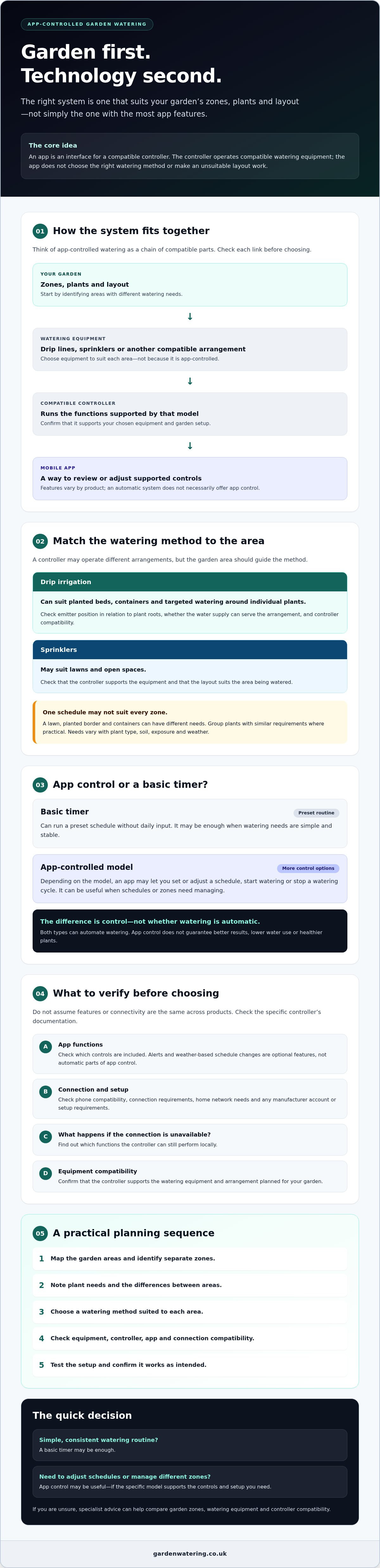
A little planning can make an app controlled garden watering system easier to set up and manage. Start with the garden, then check that the equipment and controller suit the areas you want to water. Avoid choosing one schedule for every plant: soil and exposure, along with changing UK weather and seasons, can affect how quickly different areas dry out.
- Map the areas. Mark lawns, borders and containers. Note which spots are exposed to sun or wind and which are sheltered.
- Identify the plants. Record what grows in each area and group plants with broadly similar watering needs where practical.
- Choose a method for each zone. Consider whether drip irrigation or sprinklers better suit the plants, layout and coverage required.
- Verify compatibility. Check that the controller supports the chosen equipment and that the water source, fittings and connection requirements match the manufacturer’s instructions.
- Test and observe. Check coverage and connections, then watch how the soil and plants respond before adjusting schedules.
How should you divide a garden into watering zones?
Keep areas separate when their plants, exposure or watering method differ. For example, a lawn may need a different arrangement from a border or a collection of pots. Grouping similar areas can make schedules easier to manage, but don’t combine zones just to reduce their number if conditions vary significantly. For more layout guidance, read this guide to planning an automatic plant watering system.
What should you check before setup and first use?
Confirm the water source and check that the fittings and planned layout follow the equipment manufacturer’s compatibility instructions. Once assembled, test the system and inspect connections for leaks. Check each zone to see whether water reaches the intended areas evenly. Adjust the layout or schedule only after considering soil and plant conditions. Don’t rely on fixed timings instead of observing how your garden responds.
UK weather and watering needs change through the year. Review schedules as conditions shift, and check with your local water company for any current restrictions before watering. Garden Watering offers product-selection and setup advice, but does not provide installation services. For help considering equipment that suits your garden zones, ask Garden Watering for product advice.
Choosing an App-Controlled Garden Watering System with Specialist Advice
Build your shortlist around your garden’s requirements, not a promise of smart features. Before choosing an app controlled garden watering system, check that the watering method suits each area and that the specific controller supports the equipment and app functions you want. Don’t assume every automatic watering product, including every item in a retailer’s range, can connect to a phone.
- Garden zones: Note how many areas need watering and whether their schedules or methods differ.
- Watering method: Decide whether drip irrigation, sprinklers or another suitable setup fits each zone.
- Controller compatibility: Confirm the controller works with your selected watering equipment and can manage the required zones.
- Connectivity: Check the connection method, supported phones, internet requirements and any additional components.
- Support: Look for clear product instructions and advice that helps you assess the setup before buying.
How can specialist advice help narrow the options?
Matching equipment to a garden layout can be easier with informed product advice. Garden Watering has over 15 years of experience advising on watering systems. If you ask for advice, share a simple garden layout, the plants and areas you need to water, your preferred method, and any existing equipment or controller. These details help focus the discussion on relevant options without assuming that a particular product offers app control.
Garden Watering specialises in Hozelock automatic watering systems and also offers drip irrigation systems, pop-up sprinklers and watering kits. Explore the Hozelock watering range, then verify any app, controller or connectivity requirements against the exact product documentation before choosing.
What should your final shortlist include?
Write down the number of zones, the watering method for each, and the controller functions you need. Then check the product instructions for app compatibility, connectivity, supported devices and any separately required components. If app access is essential, confirm the specific function you need, such as schedule changes or remote control, rather than relying on a general “automatic” or “smart” description.
Garden Watering provides product-selection and setup advice, not installation services. For a useful next step, share your garden layout and watering requirements with Garden Watering. Compare suitable equipment against your verified app requirements and choose the option that fits your garden, not simply the one with the longest feature list.
Choose a System That Fits Your Garden
The right app controlled garden watering system starts with your garden’s needs, not the length of its feature list. Match watering methods to your zones, then verify that the specific controller supports your equipment, phone and connectivity requirements. If your routine is simple and rarely changes, a basic timer may be all you need.
App control can make schedule adjustments more convenient, but it won’t automatically improve watering or suit every setup. Check product instructions carefully, and observe how your plants and soil respond before changing schedules. A well-matched system is easier to use and more likely to suit your garden layout.
Garden Watering has over 15 years of experience advising on watering systems, with a specialist range that includes Hozelock systems, drip irrigation and pop-up sprinklers. Explore the options and get advice to compare suitable equipment, while confirming app capabilities for each specific product. Explore garden watering systems and get specialist advice, then choose with confidence and enjoy a watering setup that works for your garden.
Frequently Asked Questions
Is an app-controlled garden watering system worth it?
It can be worth it if you regularly adjust watering schedules, manage separate garden areas or need to control compatible equipment remotely. If your routine is simple and predictable, a basic timer may be enough. Compare the app’s confirmed functions with the tasks you need, and check connectivity requirements before buying. App control alone doesn’t guarantee lower water use; results depend on settings, garden layout, plants and conditions.
Can I control any garden watering system with an app?
No. App control depends on the specific controller and whether it’s compatible with the watering equipment. Some automatic systems use standalone timers and don’t connect to an app. Check the manufacturer’s product information for supported phones, connection requirements and available controls. Confirm that the controller, water supply and watering equipment work together as a complete setup. A timer, hose or irrigation kit doesn’t become app-controlled simply because it’s automatic.
How does an app-controlled garden watering system work?
An app controlled garden watering system uses a compatible controller to run or adjust watering schedules through a mobile app. Depending on the model, you may be able to change a schedule or manually start and stop watering. The controller still needs to operate compatible watering equipment. Connection methods vary, so check the product documentation to see whether the system uses Wi-Fi, Bluetooth, a hub or another method, and which functions are supported.
Do app-controlled watering systems need Wi-Fi?
Not all app-controlled systems use the same connection method. A particular controller may require Wi-Fi, Bluetooth, a hub or a connection only during setup, so check the manufacturer’s instructions for the exact model. Consider whether there’s a suitable signal where the controller will be used. Also confirm whether remote access works when you’re away from home or only when your phone is nearby, as this varies by product.
Can an app-controlled system water different parts of a garden separately?
That depends on the controller’s supported zones and the equipment connected to it. Some systems may allow separate schedules, while others operate a single watering circuit. Map the lawn, planted beds and containers before choosing, then check how many zones the controller can manage independently. Match the watering method to each area and follow the manufacturer’s compatibility guidance to confirm that the controller can operate your planned setup.
Will an app-controlled watering system save water?
App control alone doesn’t guarantee lower water use. A suitable schedule and watering method may help avoid unnecessary watering, but results depend on the plants, soil, weather, layout and settings. Check the product documentation before relying on features such as weather-based adjustments. Review any current restrictions from your local water company, and observe garden conditions rather than leaving an unsuitable programme unchanged as the seasons or weather shift.
Can I add app control to an existing garden watering system?
Possibly, if a compatible controller can operate your existing equipment and connections. Before buying, check the controller’s specifications, your system layout and the manufacturer’s compatibility information. Existing timers or fittings may not suit every controller. If you’re unsure what you have, note the equipment and how your garden is divided into watering areas before seeking advice. Garden Watering has over 15 years of experience advising on watering-system product selection.
`-
Posted in
app controlled garden watering system, app controlled watering, drip irrigation, garden tech, garden watering, irrigation controllers, lawn sprinklers, smart gardening, smart irrigation